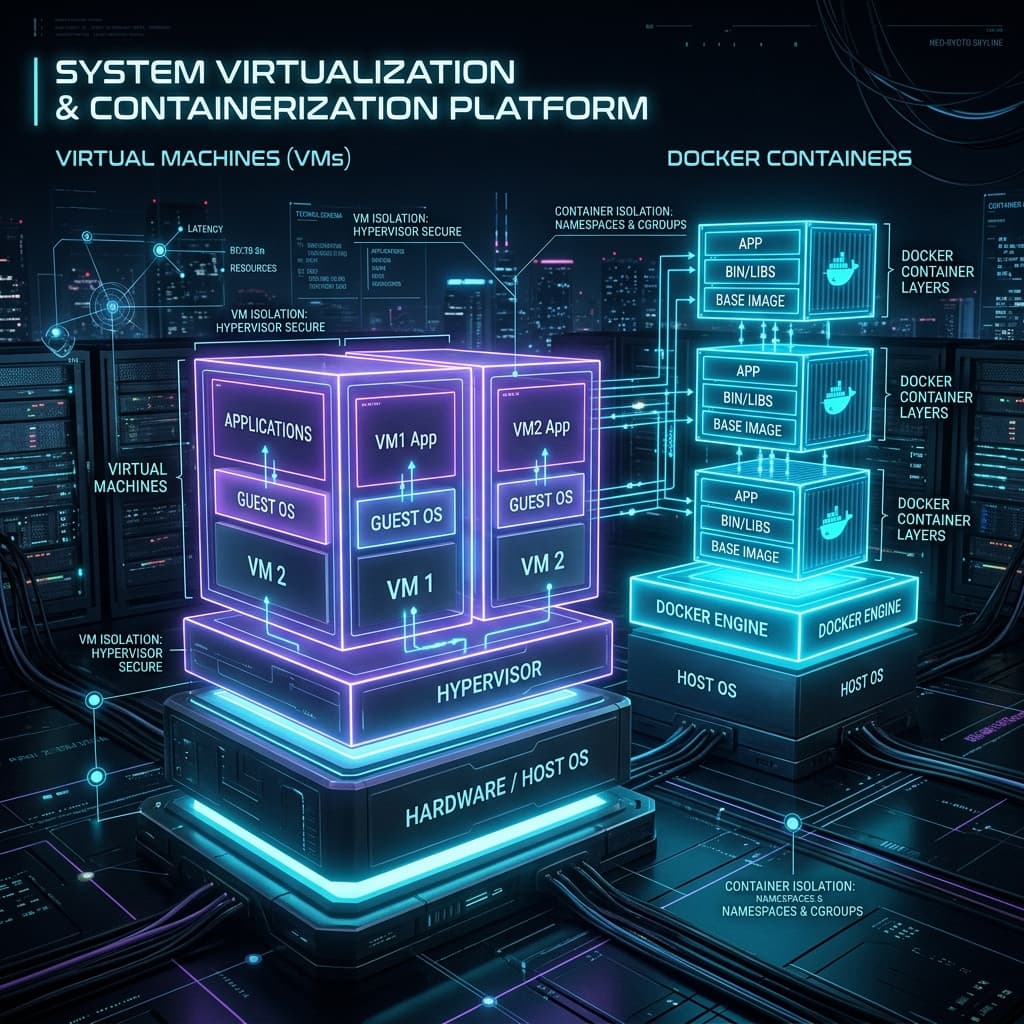
The Evolution of Isolation: Systems Virtualization vs. Containerization
For systems architects, operations leads, and security engineers, the core mission of infrastructure design has always remained constant: efficiently isolate workloads while maximizing hardware utilization.
Throughout computing history, we have transitioned from monolithic bare-metal operating systems where a single runaway process could panic the kernel, to hardware-assisted virtualization clusters, and finally to microsecond-fast kernel-level container namespaces.
This deep-dive architectural article explores the technical foundations of Hardware-Assisted Virtual Machines (VMs), Kernel-Level Containers, and Declarative Development Wrappers (Vagrant)—analyzing their schedulers, memory barriers, security profiles, and real-world trade-offs.
🗺️ The Spectrum of Isolation Technologies
Virtualization technologies operate across different abstraction boundaries. The visual below summarizes the core differences in system architectures:
+-----------------------+   +-----------------------+   +-----------------------+
|  Virtual Machines     |   |  Linux Containers     |   |  Vagrant Abstraction  |
|                       |   |                       |   |                       |
|  [App A]   [App B]    |   |  [App A]   [App B]    |   |  +-----------------+  |
|  [Guest]   [Guest]    |   |  [Namespace/Cgroups]  |   |  |   Vagrantfile   |  |
|  +-----------------+  |   |  +-----------------+  |   |  +--------+--------+  |
|  |   Hypervisor    |  |   |  | Container Engine|  |   |           v           |
|  +-----------------+  |   |  +-----------------+  |   |  [VirtualBox/Libvirt] |
|  |     Host OS     |  |   |  |  Shared Kernel  |  |   |  [Nested Guest VM]    |
|  +-----------------+  |   |  +-----------------+  |   |  [HA Consul Clustered]|
|  |    Hardware     |  |   |  |    Hardware     |  |   +-----------------------+
+-----------------------+   +-----------------------+
1. Systems Virtualization: The Hardware-Assisted Hypervisor (VMs)
Virtual Machines rely on hardware virtualization to emulate complete computers, including simulated CPUs, memory chips, storage devices, and network controllers.
A. The Core Engine: The Hypervisor
At the heart of any VM architecture is the Hypervisor (or Virtual Machine Monitor/VMM). Hypervisors are categorized into two structural patterns:
- Type-1 (Bare-Metal): Runs directly on the host's physical motherboard (e.g., Proxmox VE/KVM, VMware ESXi). The hypervisor handles CPU scheduling and memory mapping natively, yielding near-metal efficiency.
- Type-2 (Hosted): Executed as an application within a standard host operating system (e.g., VirtualBox, VMware Workstation). The hypervisor must pass calls through the host OS scheduler, adding structural latency.
B. Hardware Acceleration: Intel VT-x and AMD-V
To bypass the severe performance penalties of software instruction translation, modern CPUs utilize hardware extensions (Intel VT-x and AMD-V). These extensions add a dedicated execution state: VMX Root (for the hypervisor) and VMX Non-Root (for the guest OS).
- Ring Deprivileging: Instead of running the Guest OS kernel in Ring 0 (which would conflict with the host kernel), hardware-assisted virtual engines execute the guest kernel in "Ring 0 Non-Root". When the guest attempts privileged operations, the CPU triggers a hardware-managed trap called a VM Exit, returning control to the hypervisor in VMX Root mode.
- Extended Page Tables (EPT / SLAT): CPU-level memory translation engines that map guest physical memory addresses directly to host physical memory addresses, removing hypervisor software translation overhead.
2. OS-Level Virtualization: Kernel Isolation (Containers)
Unlike virtual machines, Containers do not emulate hardware. Instead, they run natively on the host's CPU and share the underlying host operating system kernel. Isolation is achieved entirely in software via two core Linux kernel primitives:
A. Linux Namespaces (The Virtual Boundaries)
Namespaces wrap system resources in logical boundaries. A process running inside a container believes it has its own private view of the host machine:
pid(Process ID): Isolates the process ID space. Process ID1inside the container maps to a completely random high-numbered ID on the host OS.net(Network): Provides dedicated virtual network devices, route tables, and port boundaries.mnt(Mount): Permits containers to mount and unmount filesystems independently without affecting the host's filesystem structure.ipc(System V IPC / POSIX Message Queues): Isolates inter-process communications.uts(UNIX Timesharing System): Isolates hostname and domain configurations.user(User IDs): Maps UID/GID ranges. A process acting asroot(UID 0) inside a container is mapped to a non-privileged user (e.g., UID 10005) on the host host.
B. Control Groups / cgroups (Resource Constraints)
While namespaces hide resources, cgroups govern resource consumption, preventing a single container from starving the host system:
- Enforces strict upper limits on memory usage, CPU cores, disk I/O bandwidth, and network priority.
- Triggers the kernel's Out-Of-Memory (OOM) killer to terminate a container if it exceeds its allotted memory limit, safeguarding the hypervisor host.
3. Local Environment Provisioning: Vagrant
If Virtual Machines are raw infrastructure and Containers are packaged code, Vagrant is the declarative orchestration wrapper that bridges the gap for local operations and development workflows.
A. The Vagrant Philosophy
Created by HashiCorp, Vagrant abstracts hypervisor management. Instead of clicking through Proxmox or VirtualBox GUI menus to manually define hardware sizes, networking interfaces, and installer ISOs, you define the entire target architecture in a single declarative configuration file: the Vagrantfile.
B. How Vagrant Interfaces with Hypervisors (Providers)
Vagrant does not build its own hypervisor. Instead, it utilizes modular pluggable extensions called Providers to control standard runtimes:
virtualbox: The default, lightweight, cross-platform provider for local desktop development.libvirt: A high-performance provider that interfaces directly with Linux KVM/QEMU, providing native near-metal execution on Linux systems.docker: Uses Docker containers as backend nodes instead of virtual machines, optimizing start times.
C. Declarative Configuration & Provisioners
Within a Vagrantfile, you declare:
- Boxes: Immutable baseline guest operating system templates (e.g.,
ubuntu/noble64for Ubuntu 24.04). - Networks: Defines bridged networks, static IPs, and forwarded ports.
- Provisioners: Automated shell scripts, Ansible playbooks, or Chef recipes that execute automatically on system bootstrap to configure the target application stack.
📊 Comprehensive Comparison Matrix
The table below contrasts the low-level properties of Virtual Machines, Linux Containers, and Vagrant Abstraction Layers:
🎯 Best Suited Architecture Scenarios
When to Use Virtual Machines (VMs)
- Multi-Tenant Clouds: Environments requiring absolute security boundaries between independent customers.
- Kernel Dev / Custom Kernels: Situations requiring unique operating systems (Windows, FreeBSD) or specialized kernel builds.
- Legacy Architectures: Applications that rely on direct access to bare-metal hardware features or low-level storage architectures.
When to Use Containers
- Microservices Architectures: High-scale distributed web nodes, routing layers, and micro APIs.
- Dynamic Autoscaling Pipelines: Systems that spin up and down hundreds of processing threads on-demand.
- Continuous Integration (CI/CD): Instant, stateless unit tests and build sandboxes.
When to Use Vagrant
- Local Infrastructure Sandbox Simulation: Simulating production-grade multi-node clusters (like a Consul HA service mesh) completely locally.
- Cross-Team Standardized Workstations: Providing identical development servers to Windows, macOS, and Linux developers to eliminate "works on my machine" errors.
- Automation Testing (Ansible/Terraform): Testing provisioning workflows against fresh, clean VM boots before running them in staging or production.
📈 Summary: Choosing Your Isolation Layer
Modern systems architecture is rarely a game of "either/or". Standard production environments pair the security of Type-1 Hypervisors (Proxmox VE) to segment computing nodes, deploy Linux Containers inside those nodes to maximize workload density, and orchestrate it all locally using Vagrant & Libvirt to test system configurations declaratively inside a single workstation.
Understanding these virtualization baselines is critical to building robust, high-performance, and secure cloud-native platforms.
Infrastructure Insights
This architecture blog is part of our ongoing effort to document the evolution of cloud-native systems. For deeper technical discussions, join our Discord nexus.